
LibreOffice has a database application called Base. It can connect to various database management systems, and is integrated with two internal database engines: Firebird and HSQLDB. Here I discuss how to add catalog and schema support for SQL functions in LibreOffice Base. (more…)
Category: EasyHack
Warning for low disk space – difficulty interesting EasyHack
Without enough space, one may face data corruption, which is really a terrible thing that can possibly happen for someones important data. In order to avoid falling into such a situation, it is good idea to give warning to the users in advance.
Code Pointers for generating warning for low disk space
To implement such a feature in LibreOffice, first place to look is this file sfx2/source/doc/sfxbasemodel.cxx.
The method to query the free space method should be added to the sal/osl folder in LibreOffice core source code. To add OS specific code, one may use unx and w32 folders inside it.
Please note that LibreOffice needs to know the disk space on different devices, so passing a vector containing path and free disk space is a good suggestion here.
You should know that guessing the required disk space to save the file is not easy. So, the idea is to have several megabytes free to avoid facing problems. That is in cases the file is not actually very huge. It is possible to add that limit as an option, placed in Tools > Options. These days, even 100-200 megabyte is not that much when comparing it to the very fast disk consumption by different applications like browsers and other similar huge software that people use regularly.
Another nice feature to implement is a handler that runs with low priority every several seconds and checks the available temporary space. That will help avoiding problems with saving images in that specifc temp directory.
Testing the Warning for Low Disk Space
One needs to create a test environment to actually test the patch in action. Using a small RAM drive, it is possible to do that. These commands are useful to create a 20 MB partition for testing:
mkdir /tmp/small
sudo /bin/mount -t tmpfs -o size=20m,mode=0700,uid=$USER,gid=$GROUP /dev/shm /tmp/small
After invoking the above instructions and filling the disk space, you can invoke LibreOffice with the below command to use temp drive. As a result, you will get the below error message:
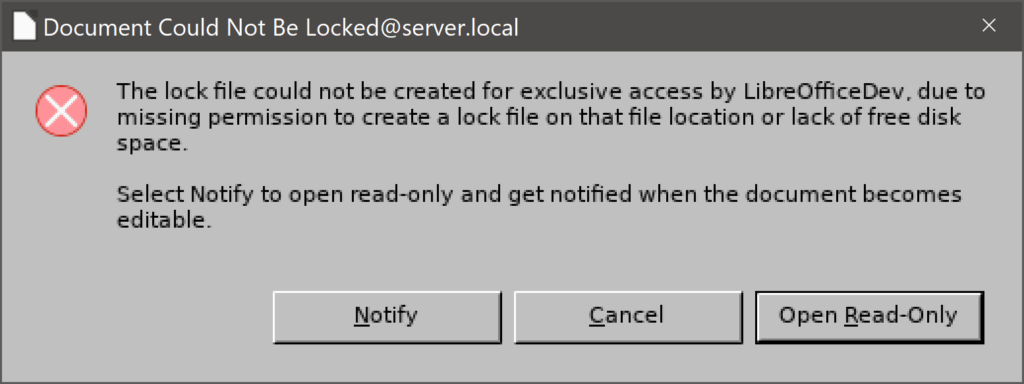
But, no warning message is shown when you have some small disk space which is < 1 MB.
$ instdir/program/soffice -env:SAL_USE_VCLPLUGIN=gen -env:UserInstallation=file:///tmp/small /tmp/small/1.pptx
While having < 1 MB disk space, you will get this warning in the terminal, but not when the space is between 1 and 2 MBs.
warn:configmgr:57868:58063:configmgr/source/components.cxx:190: error writing modifications com.sun.star.uno.RuntimeException message: "cannot write to file:///tmp/small/user/nnePqE at ~/Projects/libreoffice/core/configmgr/source/writemodfile.cxx:109"
Please note that both the profile and the opened file were inside /tmp/small.
Final Words
The above issue is tdf#60909. If you like it, just follow the Bugzilla link to see more information.
To implement this feature, first you have to build LibreOffice from the sources. If you have not done that yet, please refer to this guide first:
Find and replace For Base – difficulty interesting EasyHack
LibreOffice Base is part of LibreOffice productivity suite that makes it possible to work with databases. It is an alternative to MS Access. One of the proposed enhancement for Base is to add a “Find and replace” dialog. Right now, a “Find” dialog is available, but it is not possible to do the replacement with the LibreOffice Base dialogs. This issue is filed as tdf#32506.
The importance
This was requested for a long time ago, but until now no developer has put time to make it a reality. This feature request has is a difficutlyIntersting EasyHack, which means it is among the EasyHacks that need more work compared to the difficutlyBeginner and difficutlyMedium ones.
I will describe the details of the task, and if you find it interesting, you can start working on it. Solving difficutlyIntersting EasyHacks is among the criterias for selecting GSoC candidates, so it worth trying if you want to be among next year GSoC candidates.
It is worth mentioning that MS Office provide a comparable functionality in “Find and replace” dialog for MS Access. Thus, it would be helpful for the people migrating from Access to Base.
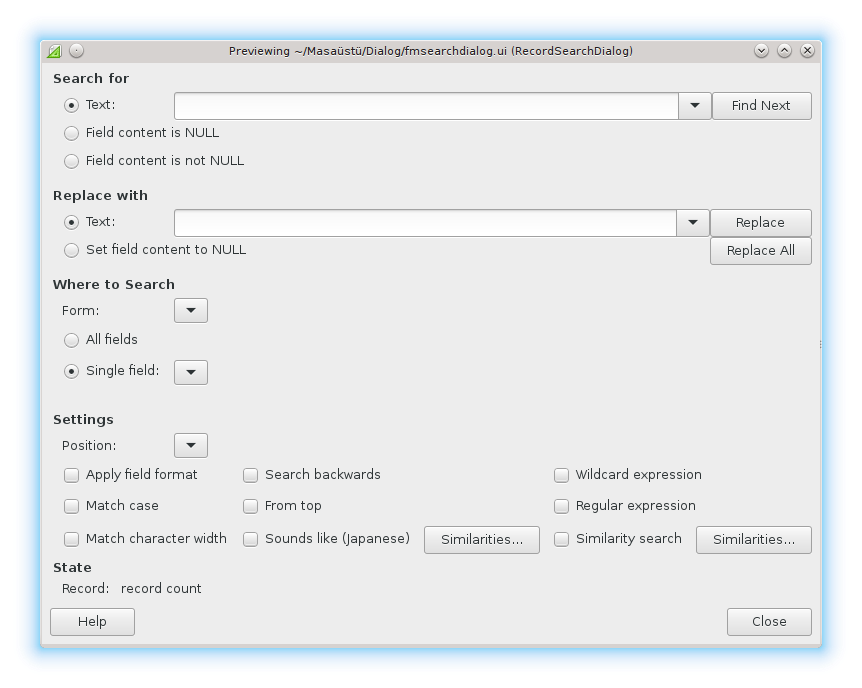
Proposed UI Design for Find and Replace
Enrique, which proposed this enhancement, also provided a design for the “Search and replace” dialog.
Code Pointers For Implementing Find and Replace
As described, this enhancement will be extending the search functionality of Base with the ability to do replacement, which is not currently available from dialogs. It is however possible to use SQL queries to do the replacement. Then, the task would be extending the search dialog, and then adding the required methods that use SQL to do search and replacement.
Lionel, a LibreOffice Base developer, has suggested this path, which I have updated:
The discussed dialog is instantiated in this C++ file
dbaccess/source/ui/browser/brwctrlr.cxx:1798:
pDialog = pFact->CreateFmSearchDialog(getFrameWeld(), sInitialText, aContextNames, 0, LINK(this, SbaXDataBrowserController, OnSearchContextRequest));
pDialog->SetActiveField( sActiveField );
pDialog->SetFoundHandler( LINK( this, SbaXDataBrowserController, OnFoundData ) );
pDialog->SetCanceledNotFoundHdl( LINK( this, SbaXDataBrowserController, OnCanceledNotFound ) );
pDialog->Execute();
pDialog.disposeAndClear();
As the SetFoundHandler() uses OnFoundData, we search the same file for "OnFoundData", and find it in the line 2347:
IMPL_LINK(SbaXDataBrowserController, OnFoundData, FmFoundRecordInformation&, rInfo, void)
{
...
}
This function is called, when a match is found.
The comment above the function SetFoundHandler() describes the idea of “found handler”s:
/** The found-handler gets in the 'found'-case a pointer on a FmFoundRecordInformation-structure
(which is only valid in the handler; so if one needs to memorize the data, don't copy the pointer but
the structure).
This handler MUST be set.
Furthermore, it should be considered, that during the handler the search-dialog is still modal.
*/
void SetFoundHandler(const Link<FmFoundRecordInformation&, void>& lnk)
{
...
}
In the above mentioned file, brwctlr.cxx, this is the start of handler function:
Reference< css::sdbcx::XRowLocate > xCursor(getRowSet(), UNO_QUERY);
This "xCursor" is the form object. The brwctlr.cxx is only for grid (table) controls. For other controls, one should look into svx/source/form/fmshimp.cxx:1544:
SvxAbstractDialogFactory* pFact = SvxAbstractDialogFactory::Create();
ScopedVclPtr<AbstractFmSearchDialog> pDialog(
pFact->CreateFmSearchDialog(
m_pShell->GetViewShell()->GetViewFrame().GetFrameWeld(),
strInitialText, aContextNames, nInitialContext,
LINK(this, FmXFormShell, OnSearchContextRequest_Lock) ));
pDialog->SetActiveField( strActiveField );
pDialog->SetFoundHandler(LINK(this, FmXFormShell, OnFoundData_Lock));
pDialog->SetCanceledNotFoundHdl(LINK(this, FmXFormShell, OnCanceledNotFound_Lock));
pDialog->Execute();
pDialog.disposeAndClear();
The corresponding OnFoundData is line 2150:
IMPL_LINK(FmXFormShell, OnFoundData_Lock, FmFoundRecordInformation&, rfriWhere, void)
{
    if (impl_checkDisposed_Lock())
        return;

    DBG_ASSERT((rfriWhere.nContext >= 0) && (o3tl::make_unsigned(rfriWhere.nContext) < m_aSearchForms.size()),
        "FmXFormShell::OnFoundData : invalid context!");
    Reference< XForm> xForm( m_aSearchForms.at(rfriWhere.nContext));
    DBG_ASSERT(xForm.is(), "FmXFormShell::OnFoundData : invalid form!");
...
}
And then we can use the form object to implement the required change to fulfill the request.
Possible Pitfalls
It is important not to cause troubles with the keys, both foreign keys and primary keys. The idea is to allow find and replace in primary and foreign keys, but then it would be the role of the underlying database engine to see if the replacement is actually possible, or not, and then raise an error message.
Also, it would be the responsibility of the users to make sure that the search and replace they issue is a meaningful one. But, anyway the developer should handle the errors from the underlying database engine.
Final Notes
To implement this feature, first you have to build LibreOffice from the sources. If you have not done that yet, please refer to this guide first:
Highlight the current row and column in Calc – difficulty interesting EasyHack
In large computer displays, it is somehow hard to track the active cell, and the associated row and column. One of the solutions provided to fix this problem is to highlight the row and column. The feature request is visible in tdf#33201: (more…)
Internal includes instead of global ones – EasyHack
In every C/C++ source code file, we use header files to put declarations of functions, data types, class, macro and other relevant things inside it. These files have the extension of .h (for C) and .hxx (for C++). (more…)
Crashes that you can fix! – EasyHack
As discussed in the “crash fixes for LibreOffice, part 1: segfaults“, bugs that lead to crash in LibreOffice or other native applications can have different causes, and therefore need completely different fixes. Some of these bugs are hard to fix: you have to change the behavior of the application in order to avoid crashes. (more…)
ODF standard and the code – EasyHack
Open Document Format (ODF) is a standard (ISO/IEC 26300) and native file format that LibreOffice uses. OASIS developed this file format based on the file format of StarOffice, the ancestor of LibreOffice. (more…)
Use std::hypot for Pythagorean Addition – EasyHack
There are many places in the code that calculating the Pythagorean addition is needed. (more…)
Use Range Based For Loops – EasyHack
Because for loops are a powerful tool in C/C++, they are one of the desirable tools when you want to do something repeatedly, or process elements of a data structures. But there many ways to write a for loop. Some forms of it are easier to use, read, write and understand, and some are not. Range based for loops are discussed in this article. They can be good if you know where to use them. (more…)